
6 Claude Code Tips That Cut Dev Time
Terminal-first workflows that eliminate context switching and repetitive tasks

Claude Code adds AI help right in your terminal. This stops the annoying tab-switching that disrupts your focus.
You don’t need to copy code snippets anymore. Now, you can work in one place. Claude reads your files, runs commands, and makes changes for you.
Here are six practical tips that changed how developers use Claude Code. These tips help save a lot of development time.
Tip 1: Master CLAUDE.md for Persistent Project Context
Stop re-explaining your project every single session. Create a CLAUDE.md file in your project root. This gives Claude permanent context about your codebase.
This file acts as your project’s instruction manual. When Claude starts each session, it knows your tech stack, architectural choices, coding rules, and usual tasks.
What to include:
# Project Context

## Tech Stack
- Next.js 14 (App Router)
- TypeScript strict mode
- Tailwind CSS
- PostgreSQL with Prisma

## Code Conventions
- Always use server components unless client interactivity needed
- API routes in `/app/api` with route handlers
- Database queries only in server components or API routes

## Common Commands
- `npm run dev` - Start development server
- `npx prisma studio` - Open database GUI
Tip 2: Create Custom Slash Commands for Repetitive Workflows
Slash commands are Claude Code’s secret weapon for automation. Any workflow you repeat more than twice deserves its own command.
Create a .claude/commands directory in your project. Each markdown file becomes a reusable command.
Example: Create .claude/commands/api-endpoint.md:
Create a new API endpoint following our project conventions:

1. Create route handler in /app/api
2. Add input validation with Zod
3. Include error handling middleware
4. Add authentication check
5. Update API documentation in /docs/api.md

Ask me for the endpoint name and functionality, then implement all steps.
Now typing /api-endpoint triggers this entire workflow. No more forgetting steps or inconsistent implementations.
Common slash commands to create:
Database migrations with rollback steps.
Component creation with tests and stories.
Deployment checklists.
Code review preparation.
Tip 3: Let Claude Research Before Coding
Don’t jump straight into implementation. Claude Code excels at codebase analysis and planning.
The three-phase workflow:
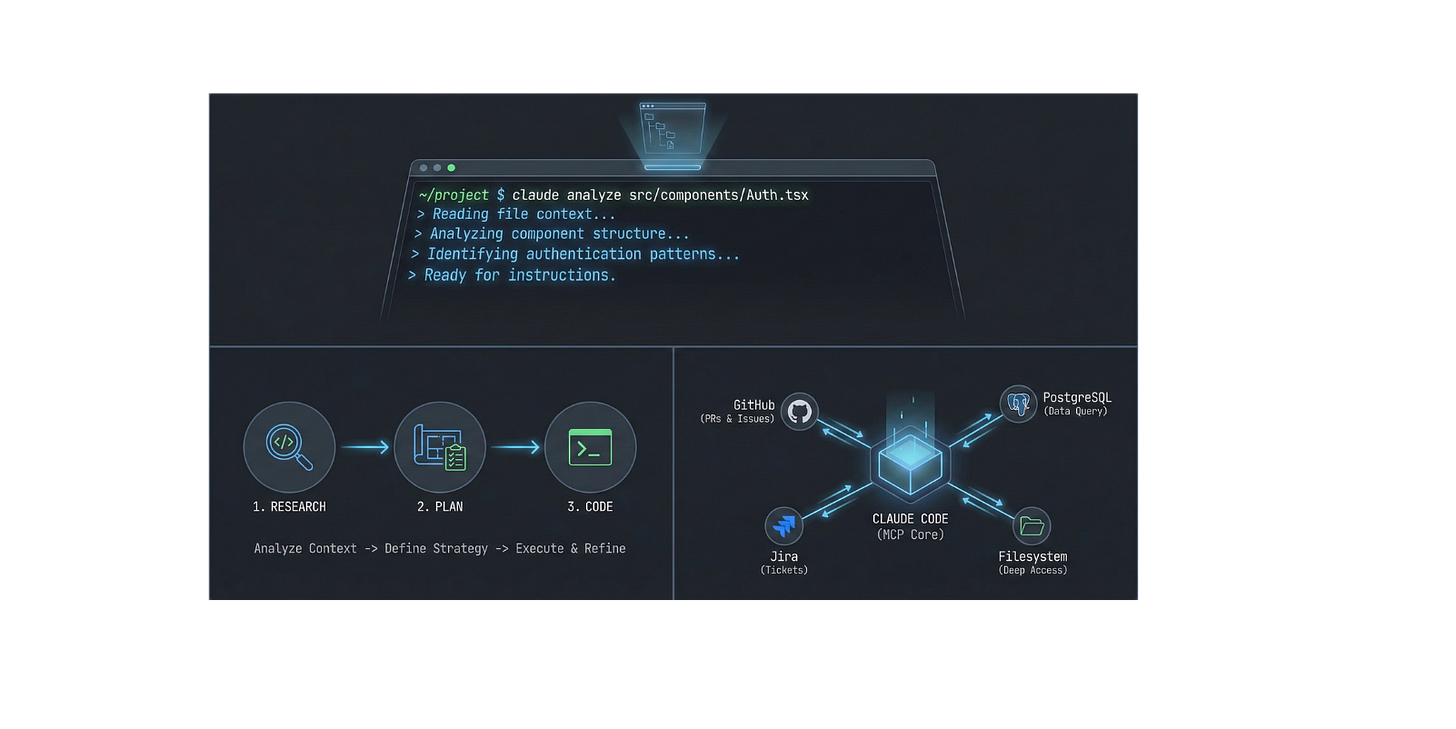
Research: “Search for all API endpoints and explain the authentication pattern.”
Plan: “I need to add rate limiting. What’s the best approach given our current architecture?”
Code: Review the plan, refine it, then execute.
This approach prevents costly rewrites. Validate your approach first. This way, you avoid coding and finding architectural conflicts later.
Before: Build a feature, discover it breaks existing auth, refactor, test again. After: Analyze the auth pattern, plan integration, and build it right the first time.
Tip 4: Leverage MCP Servers to Extend Claude’s Reach
Model Context Protocol (MCP) connects Claude Code to external tools and services. Think of it as giving Claude API access to your entire development ecosystem.
What MCP enables:
Query your production database to debug data issues.
Create and update Jira tickets from your terminal.
Deploy to Vercel or AWS with a conversion.
Review pull requests and manage GitHub issues.
Getting started: Install MCP servers through your Claude Desktop configuration file. Popular options include:
GitHub MCP: Create PRs, review code, manage issues
Postgres MCP: Run read-only queries to understand your schema
Filesystem MCP: Enhanced file operations beyond basic read/write
Example workflow: “Check the users table to see why authentication fails for user ID 12345.” Then, create a GitHub issue with your findings.”
Claude runs the database query. He analyzes the results and creates a detailed issue, all in one chat.
Tip 5: Implement Strategic Context Management
Claude’s context window is powerful but finite. Show Claude only what it needs for each specific task.
For focused changes: “Read /src/auth/middleware.ts and add rate limiting to the login endpoint.”
This keeps context tight and responses precise.
For architectural questions: “Look for all files that manage user authentication. Read the key ones. Then, explain the whole process.”
Let Claude build context progressively, starting with discovery.
The key principle: Start narrow, expand when needed. Avoid dumping your entire codebase into context at once.
Before: “Here are all my files. Figure out where to add the feature.”
After: “Search for authentication files, read the middleware, now let’s add the feature.”
Time saved: Faster, more accurate responses. Reduced back-and-forth clarifications.
Tip 6: Visual Iteration with Screenshots
Claude Code can analyze screenshots. This transforms UI development from description-heavy to visual-first.
The visual feedback loop:
Design → Screenshot: Paste your Figma mockup or design reference.
“Build this component with Tailwind CSS.”
Preview → Screenshot: Show Claude what rendered
“The spacing is off, here’s what I see.”
Refine → Done
Claude analyzes visual design, spacing, colors, layout, typography, and generates matching code. For debugging, it can spot CSS issues from screenshots faster than you can describe them in words.
Real-world application: Create a landing page with different sections. Each section has its own design needs. Screenshot each section, iterate visually, and complete the page in hours instead of days.
(I am currently redesigning my website with this approach!)
Your Next Steps
Claude Code isn’t just about writing code faster. It’s about eliminating friction, context switching, repetitive explanations, and manual workflows that drain your focus.
The developers saving much of their time aren’t working harder. They’re working smarter. Claude takes care of mechanical tasks, so they can focus on creative problem-solving.
Start with these six tips. Your future self will thank you.
Cheers friends,

Eric Roby
Find me online:
LinkedIn / YouTube / Threads
Sources Used
1. https://www.anthropic.com/engineering/claude-code-best-practices
2. https://code.claude.com/docs/en/slash-commands
3. https://modelcontextprotocol.io/introduction
Good list. The slash commands tip is solid. Since Anthropic merged commands into skills recently, the SKILL.md approach gives you the same thing plus auto-invocation, so Claude can pick them up without you manually triggering them. Put together a guide with copy-paste templates if you want to go deeper: https://reading.sh/i-built-200-claude-code-skills-heres-the-pattern-2c9669e4a71a?sk=dcf4e7939bec49686f54d69813eae51d
The CLAUDE.md tip is the one I always start with too. There's actually three levels of memory files now: project, user, and project-specific user. A hackathon winner's setup covers the layering pretty well. Also his PostToolUse hooks for auto-formatting after every edit are worth nicking. Covered his full config here: https://reading.sh/the-claude-code-setup-that-won-a-hackathon-a75a161cd41c?sk=49fecd7ce09a535e5fb39f02fa2c6c75