
Cursor vs Claude Code: Why Top Developers Are Using Both
Why choose one or the other when you can use both?

What if I told you the best AI coding setup isn’t Cursor OR Claude Code, it’s Cursor AND Claude Code?
Professional developers are using both tools, even as the internet debates which one is “better.” Here’s why that approach makes perfect sense.
The False Choice
The traditional mindset says you have to pick one AI coding assistant and stick with it. Reality reveals something different: Cursor and Claude Code solve fundamentally different problems.
Cursor is a GUI-first editor designed for flow state coding. It’s a fork of VS Code and features deep AI integration. This helps you write code without switching contexts.
Claude Code is a CLI-first agent designed for deep reasoning. It’s a tool that works well with complex tasks. It needs careful thinking.
Both cost approximately $20 to $200 per month. Cursor is trusted by more than half of the Fortune 500 companies. In December 2025, it also passed $1 billion in annual revenue. Claude Code, using Anthropic’s Opus 4.5 model, is quickly becoming popular with developers. They want strong reasoning skills. And increasingly, professional developers maintain both subscriptions.
These tools aren’t designed to compete. They’re designed to work together.
Cursor’s Power: Flow State Coding
What Makes Cursor Unique
Cursor launched version 2.0 on October 29, 2025, optimized for one thing: keeping you in flow state. Inline completions start here. They predict whole code blocks based on your file’s style, feeling almost like magic.
Cursor uses a special Composer model. It finishes agentic tasks in under 30 seconds. That’s 4 times faster than similar models. Every change appears as a visual diff preview before you accept it. Want to experiment with multiple approaches? Spawn up to 8 parallel agents and let Cursor evaluate which solution works best.
The December 2025 updates took this further. The new Visual Editor lets you use sliders to change page elements. You can move, resize, and recolor directly in the IDE.
Debug Mode uses runtime logs to help you reproduce and fix tricky bugs. And because it’s built on VS Code, every VS Code extension works seamlessly.
When to Use Cursor
Cursor shines when you’re writing new features from scratch. The inline completions keep you typing without interruption. Rapid prototyping is easy. You stay in the editor window, so there’s no need to switch contexts. That means no friction.
Frontend developers particularly love it. The embedded browser preview and Visual Editor turn the IDE into a full web design studio. When you dive into a new codebase, Cursor’s repo-aware chat knows the structure well. This makes onboarding quicker than you might think.
As one developer put it: “If you are a visual thinker or love the ‘flow state,’ Cursor is unbeatable.”
But what about tasks that require deep thinking? That’s where Claude Code shines.
Claude Code’s Power: Deep Reasoning
What Makes Claude Code Unique
Claude Code takes a completely different approach. It’s a terminal-native coding partner powered by Opus 4.5. This is Anthropic’s latest model, which has advanced reasoning. Instead of optimizing for speed, it optimizes for correctness.
The checkpoint system auto-saves your code state before each change. Made a mistake? Press Escape twice or type /rewind to return to the previous state. Version control on autopilot.
Claude Code also introduced subagents. These are smaller AI agents that manage specific tasks at the same time. The main agent builds your frontend. Meanwhile, a subagent creates the backend API. Hooks let you automate tasks at certain times. For example, you can run tests after changes or lint code before commits. And background task management means long-running processes don’t block your workflow.
The November 2025 launch of the web interface at claude.ai/code made it easier to use. However, the CLI is still where it really excels. It’s scriptable, automatable, and works over SSH in remote environments.
When to Use Claude Code
Claude Code excels at large-scale refactoring. Need to update 50+ files across your codebase? Claude Code’s careful method and strong grasp of cross-file dependencies make it the top choice.
Complex bug fixes need real thinking, not just code completion. This is another sweet spot. In a bug fix comparison, developers noted: “Claude Code worked better with tests and improved based on feedback.”
Git workflow automation is transformative. Just describe what you need in plain language. Claude Code will take care of creating branches, writing commits, and opening pull requests for you. Claude Code excels at infrastructure-as-code projects. It also automates CI/CD pipelines and generates documentation automatically.
A neat new feature is that Claude Code is now on the web. You can link a Git repository. Then, send messages to Claude Code. It will change the code and create the PR for you!
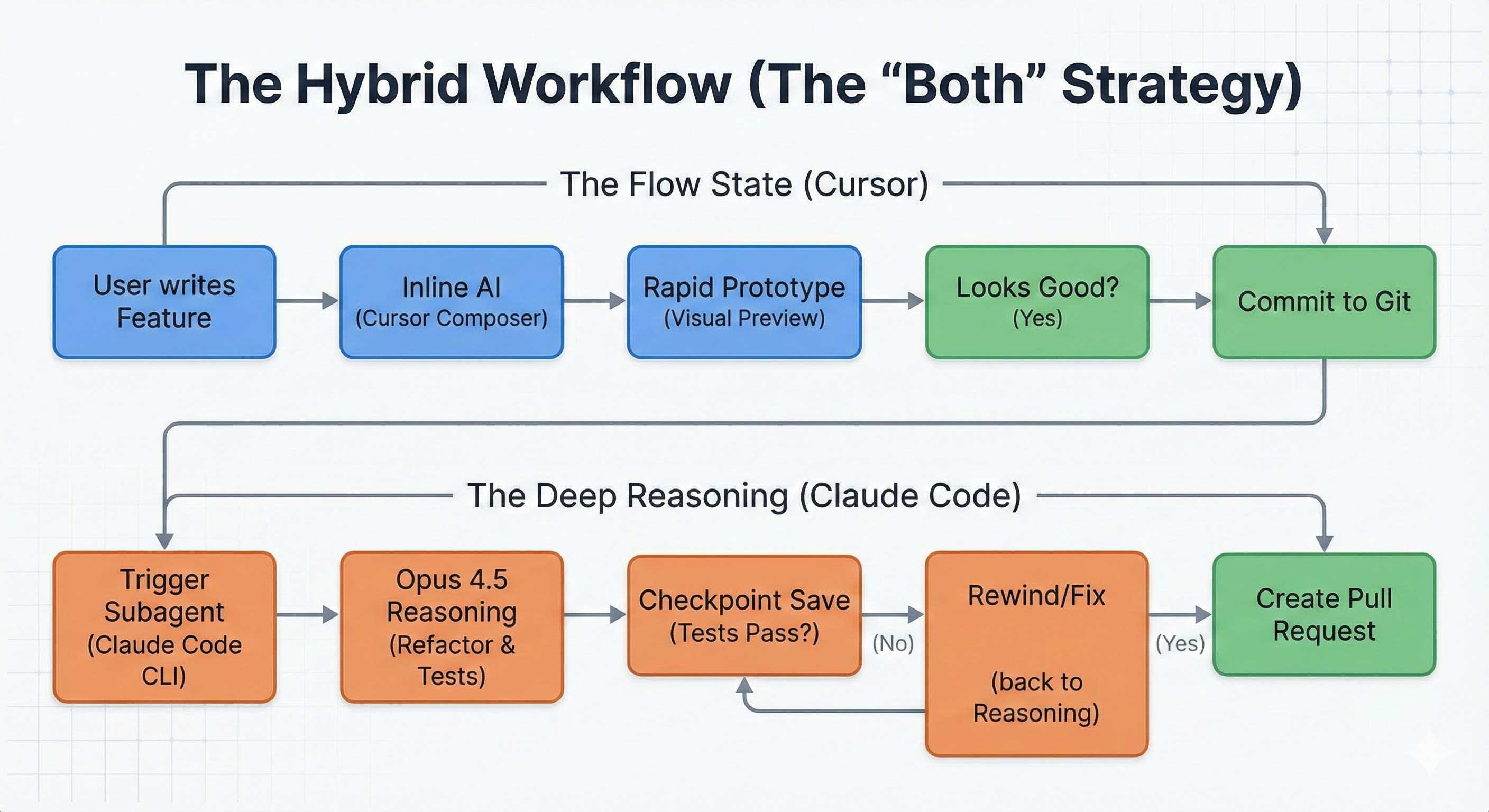
The Hybrid Workflow (The “Both” Strategy)
How Developers Use Both
Here’s how the hybrid approach works:
Use Cursor for active coding, writing features, fixing simple bugs, and rapid prototyping.
Use Claude Code for background heavy lifting, refactoring, test generation, documentation, and complex debugging.
No conflict exists because they operate in different contexts. Cursor lives in your IDE. Claude Code lives in your terminal.
You can code in Cursor with quick inline completions. Meanwhile, Claude Code refactors your old authentication module in the terminal. This isn’t hypothetical, it’s the hybrid approach in action.
The Complementary Nature
The tools optimize for different dimensions. Cursor prioritizes speed and velocity, get code written fast. Claude Code prioritizes depth and correctness, get the solution right. Cursor offers visual workflows perfect for GUI-oriented tasks. Claude Code offers scriptability perfect for automation.
This isn’t choosing between tools. It’s choosing the right tool for each moment.
The Bottom Line
The future of AI coding isn’t choosing between GUI and CLI. It’s having the right tool for the right moment.
Cursor keeps you in flow state, making the act of writing code feel effortless and fast. Claude Code handles the heavy thinking, tackling complex problems with methodical reasoning. Together, they don’t just make you faster, they transform how you work in 2025.
Cheers friends,

Eric Roby
Find me online:
LinkedIn / YouTube / Threads
Sources
Tool Documentation & Official Sources
Cursor Official Documentation - cursor.com
Cursor Changelog (2025 Updates) - cursor.com/changelog
Claude Code Documentation - Anthropic Developer Docs
Claude Code on the Web Announcement - Anthropic News
Claude Code Best Practices - Anthropic Engineering Blog
Anthropic Autonomous Features - Anthropic News
Business & Industry News
Cursor Series D Funding & Revenue - Accel
Cursor Acquires Graphite (Dec 2025) - SiliconANGLE
Cursor Visual Editor Launch - Stark Insider
Claude Code Browser & Slack Integration - WebProNews
Technical Comparisons & Reviews
Cursor AI Review 2025 - AI Tool Analysis
Claude Code vs Cursor Comparison - Qodo.ai
Builder.io Comparison Guide - Builder.io
UI Bakery Full Comparison - UI Bakery
DECODE Agency Analysis - DECODE Agency
Cursor 2.0 Performance Analysis - Skywork AI
Developer Experiences & Testing
Bug Fix Head-to-Head Comparison - Tyler Folkman on Substack
Claude Code Review - The Discourse
Cursor Reviews Collection - Eesel.ai
Claude Code Developer Tips - htdocs.dev
HaiHai AI Comparison - HaiHai.ai
Complete Claude Code Guide - Siddharth Bharath
Pricing & Cost Analysis
Cursor Pricing 2025 - CometAPI
Cursor Pricing Breakdown - Fuel Your Digital
I run both as well and the hybrid approach works. The numbers back it up too. Cursor just hit $2B ARR while Claude Code is reportedly at $2.5B. They're not really competing head-to-head so much as carving out complementary niches. I broke down the competitive dynamics and what it means for the market here: https://sulat.com/p/cursor-just-hit-2-billion-arr
I've been using Claude Code for 2 months and this comparison framing is interesting. My experience: Claude Code wins on complex multi-step reasoning, Codex wins on raw execution speed for well-specified tasks.
The choice depends more on your workflow than the task type. What surprised me most was how much context management matters - both tools degrade significantly when context gets fragmented. Anyone else seeing this?