
Loop Engineering: Stop Prompting Agents
The shift from crafting individual instructions to building autonomous cycles that run, verify, and improve themselves.

Building an AI demo is easy - shipping one to real users is harder. Microsoft Foundry helps developers build and manage AI apps across models like GPT, Claude, Mistral, DeepSeek, Llama, and more. With Foundry IQ, your agents can connect to real business context and answer from your own data. You can start directly inside VS Code with the Foundry Toolkit.
Recently, four builders who had never worked together came to a similar conclusion.
Peter Steinberger, who created the OpenClaw coding agent, put it bluntly on X: “Stop prompting coding agents. You should be designing loops that prompt your agents.”
Boris Cherny, who leads Claude Code at Anthropic, said the same thing about his own job: “I don’t prompt Claude anymore. I have loops that are running. They’re the ones that are prompting Claude and figuring out what to do. My job is to write loops.”
Andrej Karpathy said on the No Priors podcast months ago, “To get the most from the [...] tools available now, you must remove yourself as the bottleneck.” And: “I don’t want to be like the researcher in the loop, like looking at results [...] Like I’m holding the system back.”
Then Addy Osmani, an engineering leader at Google, named it: “Loop engineering is replacing yourself as the person who prompts the agent. You design the system that does it instead.”
That is the whole idea. The most important skill in AI engineering has changed. It’s no longer just about writing a good prompt. Now, it’s about creating the system that generates prompts for you. Osmani’s warning is clear: “It’s still early, so I’m skeptical. You must be careful about token costs.”
The Bottleneck Is You
In every prior era, a human sat inside the loop. The model is fast, but you are not, so your attention is the rate limiter. Karpathy asked, “How can you have more agents running longer without your help?” A better single prompt still needs you to fire it, judge it, and fire the next one. That is the wall loop engineering removes.
Three Eras, Each Wrapping the Last
Loop engineering is the third era of working with models, and each wraps the one inside it.
Era 1: prompt engineering. You type a crafted instruction and the model responds. Chain-of-thought, few-shot examples, and role prompting appeared to make each interaction more effective.
Era 2: context engineering, or harness engineering.
Focus shifted to the following:
Retrieval-augmented generation (RAG) retrieval
Tool definitions
Conversation history
System prompts
Skills files
The harness assembles that context, calls the model, and manages state. Better, but still bounded: it runs one session, then stops, and you trigger it.
Era 3: loop engineering. Design the system to trigger the agent. Feed it work and verify the output. Then, send the result to the next iteration.
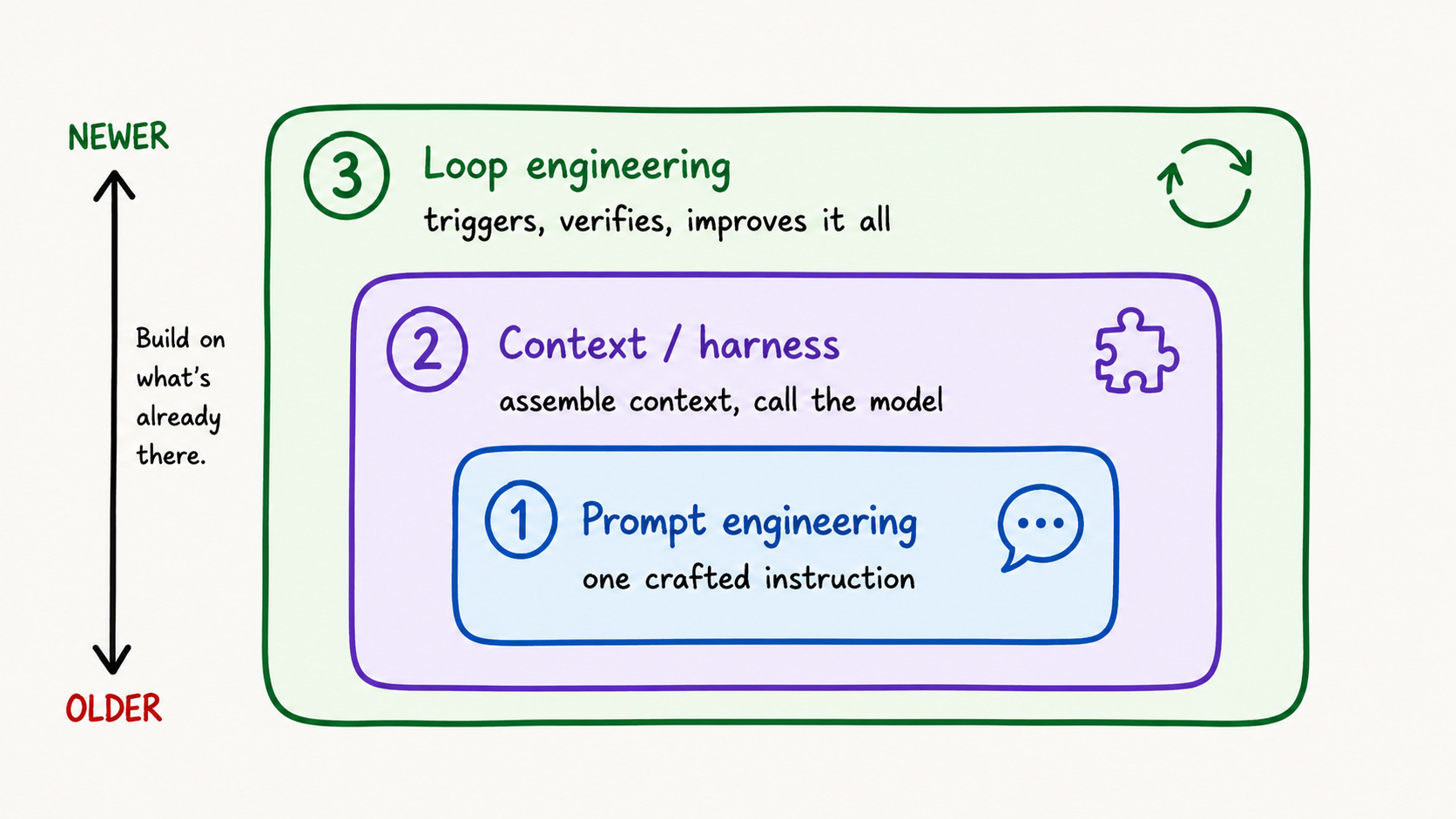
Nothing below is thrown away: a sloppy prompt inside a loop produces sloppy work faster. Swyx offered a “Salty Lesson” for agents. It echoes Sutton’s “Bitter Lesson” for models: “Don’t fix things yourself like before.” Instead, focus on systems that scale with more agents, like goals and orchestration.”
Two terms to pin down, a grader checks an output against a rubric, as deterministic code or a model acting as a judge. A trace is the recorded log of a run: every model call, tool call, and result.
What Loop Engineering Actually Is
Loop engineering involves creating autonomous agent loops. These loops prompt themselves and keep going until they finish. They also report findings without needing human oversight at each step. Osmani’s mental model is clear: “A loop is like a recursive goal. You set a purpose, and the AI keeps iterating until it’s done.” An agent session is similar to calling a function once. A loop, on the other hand, is like a service that runs continuously and picks up work as it comes in. The real substance is in the structure, so let’s get to the heart of it.
The Four-Loop Stack
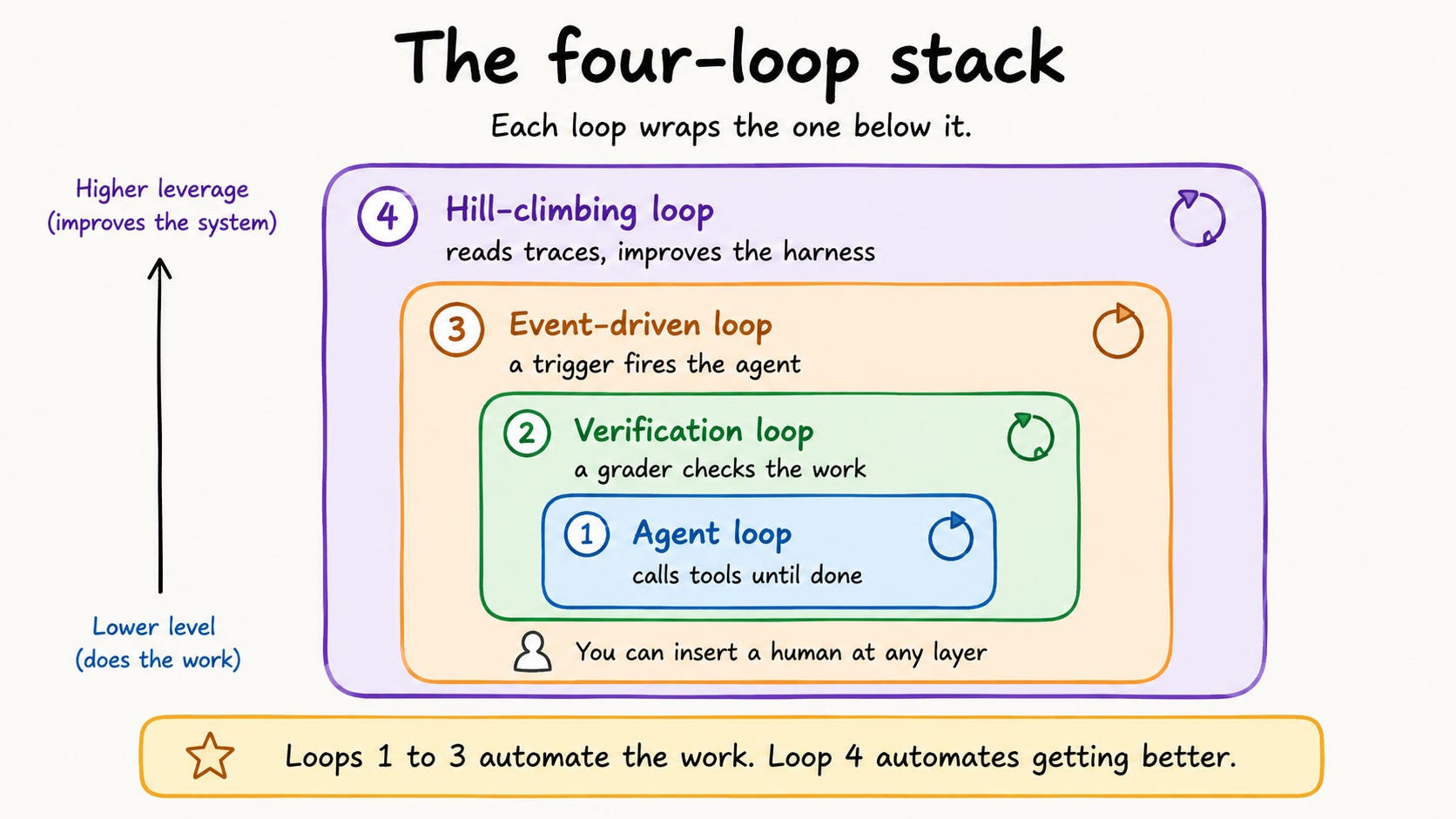
Sydney Runkle at LangChain provides a clear model. She divides production loops into four layers, each one stacking over the next. LangChain has a great example: a documentation-writing agent. This agent keeps a project’s docs up to date.
Loop 1: The Agent Loop
This is what most people picture when they say “agent.” In LangChain’s words: “At its core, an agent is just a model calling tools in a loop until a task is complete.”
For the docs agent, a request comes in and the agent plans the change, clones the repo, reads the files, writes the docs, and opens a pull request. It gets the work done, but not reliably. The first pass is often wrong.
Loop 2: The Verification Loop
Loop 2 wraps a grader around the agent loop. The grader checks the output using a rubric. If it doesn’t meet the standards, they return the work with feedback until it passes. A deterministic grader runs tests, checks links, and validates schemas. An agentic grader uses a model to judge based on written criteria. LangChain ships a piece for this called RubricMiddleware.
For the docs agent, the pull request from Loop 1 now passes checks before a human reviews it.
This includes:
Continuous integration (CI) runs
Link resolution
A diff related to the request
The trade-off is clear: verification slows things down and raises costs. But it’s worth it when quality is more important than speed.
Loop 3: The Event-Driven Loop
Loops 1 and 2 still need someone to press go. Loop 3 removes that person. As LangChain puts it: “An event fires -- a new document lands, a schedule triggers, a webhook arrives -- and the agent runs.”
For the docs agent, the trigger is a Slack channel. We activate the docs agent when a message is sent in our #docs-plz channel.
Loop 3 comes in a few common shapes:
Cron loops: time-based triggers, like a daily triage or a weekly report.
Hook loops: lifecycle triggers, like a PR opened, an issue created, or CI failing.
Goal loops: less bounded runs that continue until an objective is met.
LangSmith Deployment supports trigger infrastructure. This includes cron schedules and webhooks.
Loop 4: The Hill-Climbing Loop
The first three loops automate doing the work. Loop 4 automates getting better at it, the one that compounds and the one most people skip.
Every run produces a trace. LangChain’s framing: “Every agent run produce[s] a trace... Those traces contain high value signal regarding what’s working and what isn’t.” An analysis agent reads the traces. It spots recurring problems and rewrites the harness. This includes the prompts, tools, and grader rubrics. LangChain provides a trace-analysis agent named Engine for this. The feedback does not just loop back to the top; it reaches inside and updates the inner loops directly.
If the docs agent keeps messing up API references, the hill-climbing loop will spot it. It updates the skill file, and the next run shows improvement in untouched areas.
If you run open-weight models, this loop can feed model training, not just the harness. LangChain: “For teams using open-weight models, the hill climbing loop aids in RL fine-tuning.” It does this by using trace or eval outcomes as a training signal.” RL is reinforcement learning.
How the Loops Stack
You do not need all four on day one.
The natural order:
Loop 1 gets the agent to do the task.
Loop 2 makes it reliable.
Loop 3 ensures it’s autonomous.
Then, Loop 4 allows it to self-improve.
Removing the human is a choice, not a requirement. LangChain sees human oversight as essential. It highlights that, at every level, there are key moments when human input makes a difference. You can add a person at any level: for approval before sensitive tool calls, for a human grader, or for sign-off before outputs are sent. Now for the building blocks those loops are made of.
The Six Primitives
Osmani identifies six key primitives in a production loop. He notes that both Claude Code and OpenAI Codex use different names for all six.
Automations: These are scheduled triggers that start loops automatically. They can use cron schedules, webhooks, or events.
Worktrees: separate file-system branches that keep parallel loops from colliding. They are crucial when multiple agents work on the same codebase.
Skills: Project knowledge is written in a SKILL.md file. The agent reads and follows this information, so it’s encoded once instead of being pasted into every prompt.
Connectors are tools the agent can use. They include APIs, databases, file systems, and model context protocol (MCP) servers. MCP servers are the protocol discussed earlier in this series.
Sub-agents: One agent proposes code, and another checks it. This way, authors don’t grade their own work.
External State or Memory: This is the lasting context that stays through different iterations. It’s stored in markdown files or a project board.
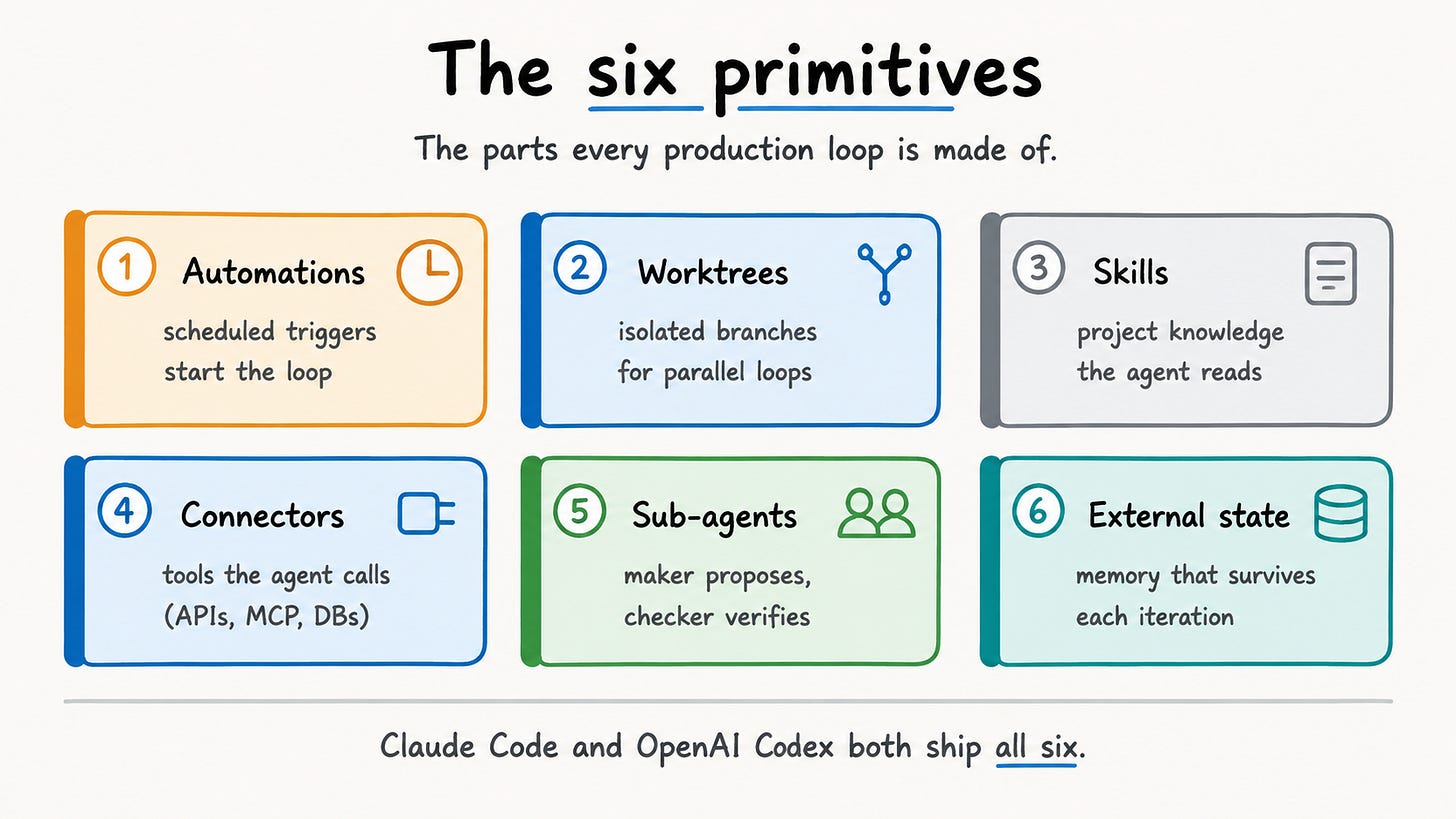
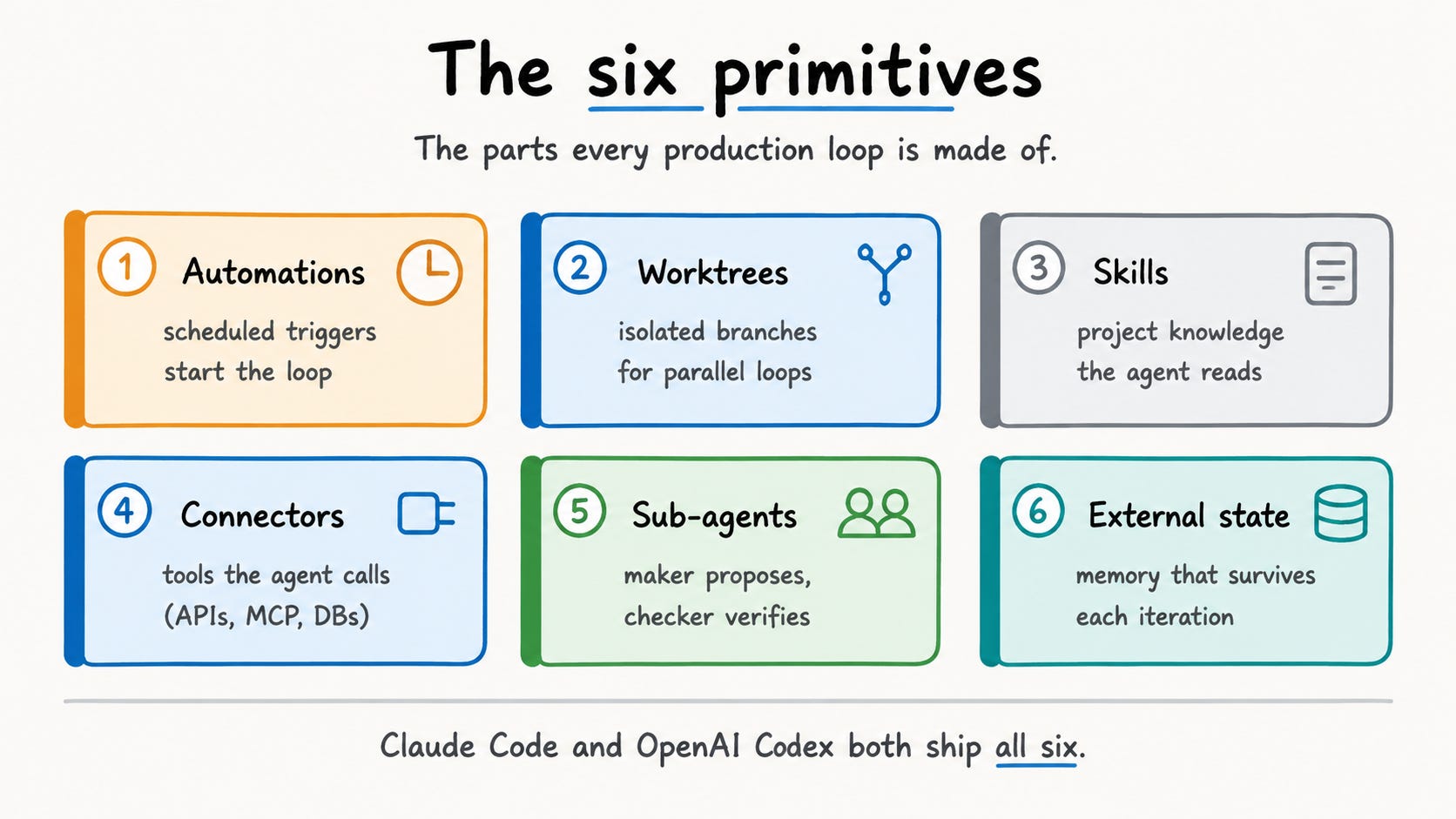
Osmani’s punchline: “once you notice the shape is the same you stop arguing about which tool.” Claude Code uses a /loop command, cron scheduling, lifecycle hooks, and GitHub Actions to expose them. OpenAI Codex offers an Automations tab and parallel subagents. Same parts, different surfaces, so the mindset is platform-independent. Ready for the patterns people actually run?
What People Build With This Today
The first three are basic shapes the tooling allows. The last two come from real, primary sources.
Daily triage, or a CI monitor. A cron loop checks yesterday’s CI failures, open issues, and commits every morning. It writes a summary for you, so you don’t have to sift through logs.
PR review. A hook loop runs on each pull request. It checks the diff and flags style issues, bugs, and missing tests. Then, it posts comments.
Dependency updates. A weekly loop opens upgrade PRs for outdated packages, runs the tests, and reports results.
Documentation maintenance. LangChain’s #docs-plz agent from above.
Research and monitoring. Karpathy’s autoresearch, the best argument that loops do not have to be complicated.
Karpathy released his autonomous research project as a public repo. He called it “autoresearch.” It’s a single-GPU version with about 630 lines of code.
The loop works like this:
The agent changes the training code.
Then, it trains for five minutes.
Next, it evaluates the results.
Finally, it decides to keep or discard the change.
This process repeats. In about 700 experiments over two days, researchers found around twenty real improvements. They reduced the time to reach GPT-2 quality from 2.02 hours to 1.80 hours. This is an eleven percent speedup on code that an expert had already optimized. A 630-line loop found it while he slept.
Boris Cherny provides strong proof. He states, “Claude Code is 100% written by Claude Code.” He hasn’t written any code by hand in about eight months. In one thirty-day period, Cherny worked only through loops. He didn’t open an IDE at all. Still, he shipped 259 pull requests, made 497 commits, added about 40,000 lines, and removed 38,000 lines.
Two caveats. The timing: the 259-PR month was December 2025. His “100% written by Claude Code” confirmation arrived in March 2026. Both events happened before the naming moment in June 2026. Cherny leads Claude Code at Anthropic. He focuses on the agent and has access to frontier models. This is the end state the concept points toward, not a starting setup for you. Treat it as the ceiling, not the floor.
Now for what matters most to a backend engineer.
The Cost Reality: Token-Rich vs Token-Poor
Loops burn tokens. Osmani pointed out a risk. He linked his doubt to “token costs.” Usage patterns can change a lot if you have many tokens or just a few.
Agent loops make many more model calls than single-shot prompts. A common rule of thumb is 10x to 100x more. Costs add up since each call re-sends the growing history. Treat that 10x to 100x as an industry estimate and a directional range, not a measured constant. A 20-iteration loop with verification is already 40-plus calls for one task.
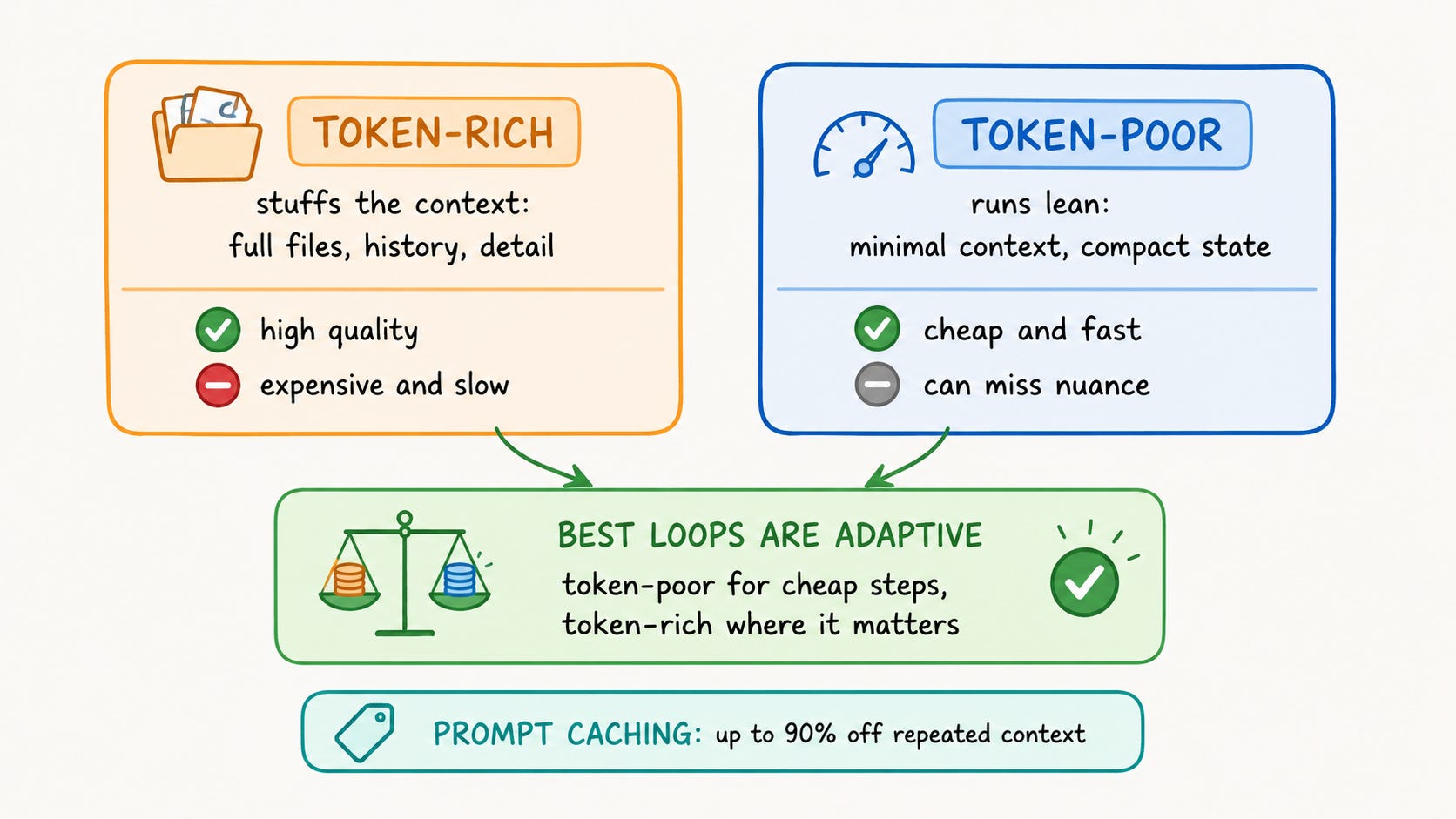
Osmani’s token-rich versus token-poor framing helps:
Token-rich loops stuff long context windows with full files, history, and detailed instructions. Quality per iteration is high, but expensive and slow.
Token-poor loops run lean: minimal context, compressed state, surgical tool calls. Cheaper and faster, but they can miss nuance.
The best loops adapt. They use few tokens for cheap steps, like triage. For important steps, like the final review, they use many tokens.
A few techniques separate an affordable loop from a ruinous one:
Model routing.
Use the cheapest model for each step:
Small and fast for classification.
Mid-tier for drafting.
A frontier model only for the final review.
Prompt caching. Cache the repeated prefixes -- system prompts, skill files -- that every iteration re-sends. Anthropic’s numbers show that cached input tokens cost just 10% of the base input price. This can lead to a 90% reduction in input costs for long, repeated prefixes. OpenAI and Google offer caching too.
Iteration budgets. Set a hard max_iterations cap and fail gracefully. A loop with no ceiling is a blank check.
Tool-call budgets. Budget tool calls per iteration and treat exhaustion as a failure signal.
Context compression. Summarize between iterations into compact working memory instead of carrying a forever-growing transcript.
For any scheduled loop, this cost work is not optional.
What Breaks When Loops Run Unattended
Cost is the bill; reliability is the harder problem. An unattended loop with tool access fails in ways a human-in-the-loop setup never would.
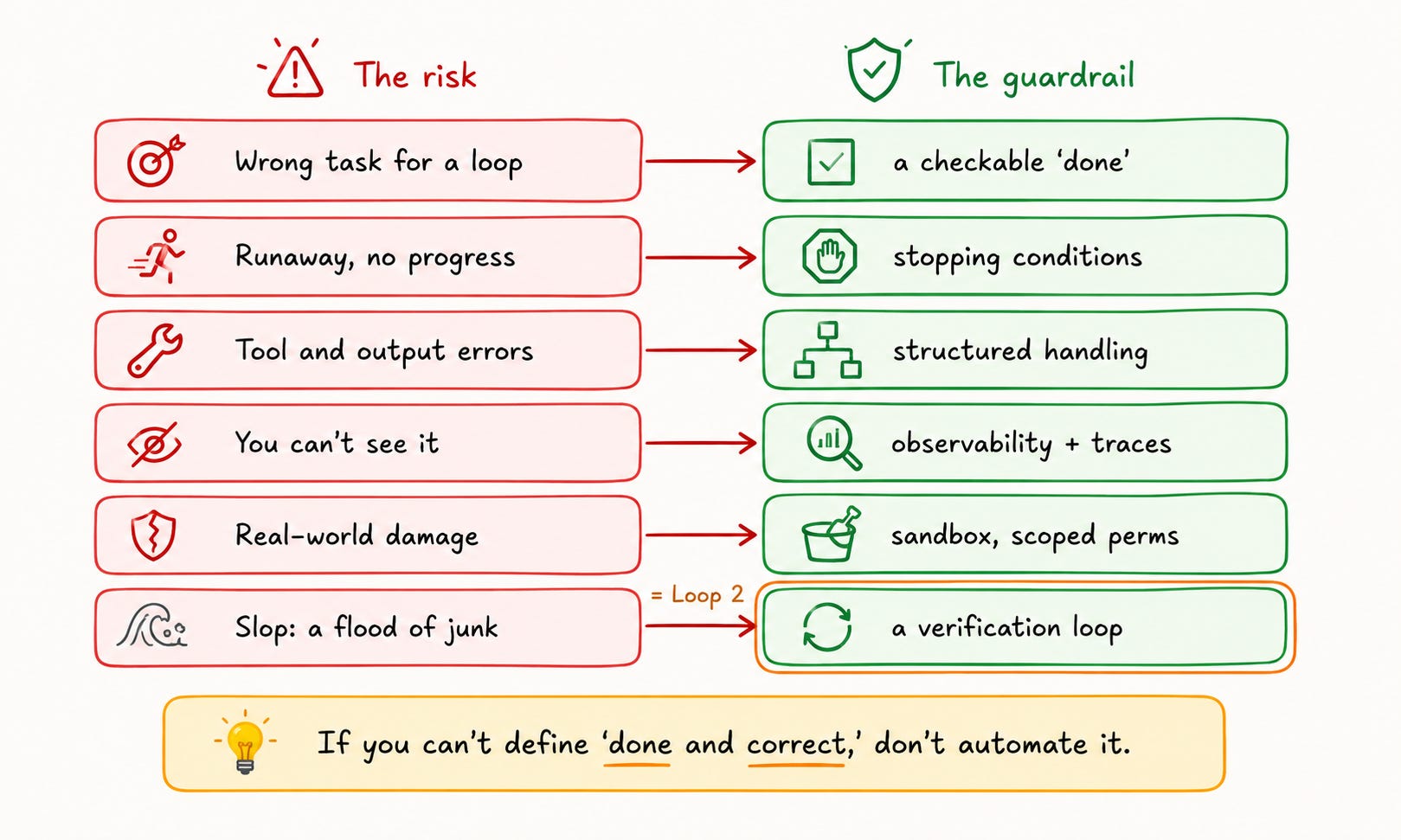
Pick the right tasks. Loops work well for repeatable tasks with a clear definition of done. They don’t help when tasks are one-time, unclear, or hard to verify. If you cannot write down what “done and correct” means, you cannot automate it.
Stopping conditions are the critical design decision.
Decide early when the loop will stop. It can end due to:
Task completion
Exhausted iteration budget
Exceeded cost budget
No progress detected
Human override
A bad failure mode is a loop that runs endlessly. It quietly wastes tokens. Detecting a stall means checking output quality over time. It’s not enough to just see if the loop runs.
Error handling needs structure at every level. Handle tool-call failures, malformed output, and grader-detected regressions distinctly. Good feedback includes the code that caused the error and whether it is new or repeated. Keep a running log, then summarize it into compact working memory.
Observability is not optional. With deterministic code, you can trace every step in the source. But with an agentic loop, the trace exists during the run. So, you need logging and dashboards to track it. LangSmith tracks each step of a run. It works with direct provider calls, not just through a framework.
Sandboxing is a security requirement. An unattended loop can modify files, open PRs, call APIs, and touch production. Sandbox it: use worktrees for file isolation. Set scoped permissions and review gates before any real-world action.
The slop risk is real. Autonomous loops can produce high volumes of low-quality output. A loop that opens 50 PRs a day where 40 are wrong creates more work, not less. This is why Loop 2 exists.
When verification is hard or the task does not recur, skip the loop. A single supervised session, or a plain harness you trigger by hand, is often the right tool.
How Early Is This, Really
Early. Honestly early. The concept took shape over ten days in June 2026. Osmani shared an essay on the 7th and 8th. Then, Steinberger posted on the 8th. Swyx released the Loopcraft piece on the 12th. Lastly, LangChain introduced a four-loop framework on the 16th.
That said, the practice predates the name. Engineers were already making ad-hoc versions. They used retry-on-failure, event triggers, and log reviews to tune prompts. What’s new is the clear structure. Also, both Claude Code and OpenAI Codex now offer primitives as first-class features.
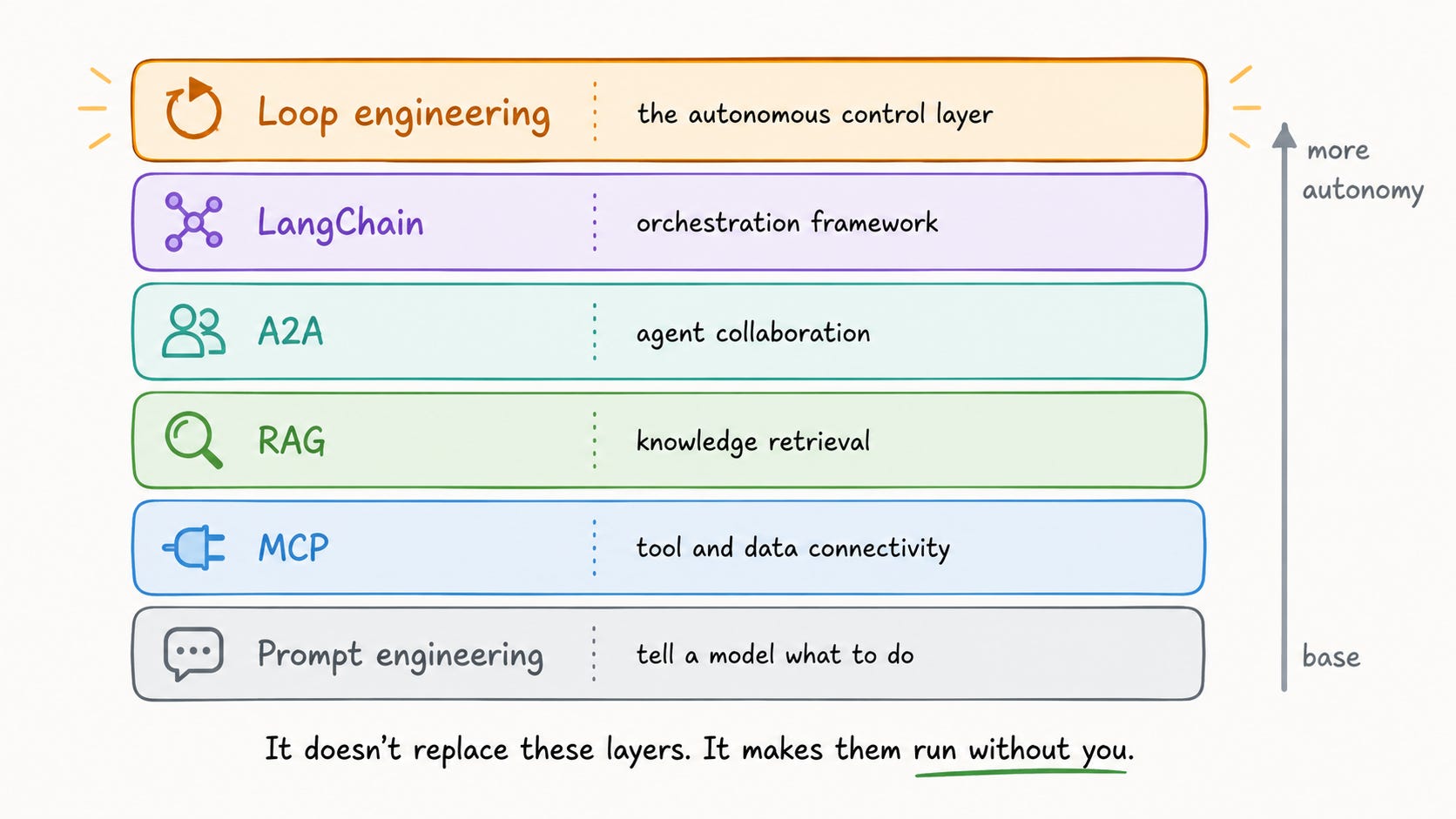
As the final article in the series, here is how loop engineering sits on everything before it:
Prompt engineering is the foundation: telling a model what to do in a single interaction.
MCP is tool and data connectivity: the protocol connecting agents to external systems.
RAG is knowledge retrieval: pulling in relevant information at query time.
A2A is agent collaboration: how agents from different systems work together.
LangChain is the orchestration framework: building blocks for composing all of this.
Loop engineering is the top layer that controls everything below. It triggers actions, runs processes, verifies results, and drives improvements.
Loop engineering does not replace any of those layers. It makes them run without you.
Where This Leaves You
The leverage point has moved. Optimizing prompts helps, but there’s a limit. A better prompt still needs you to use it. The multiplier exists in designing a system that runs, checks, and enhances agents by itself.
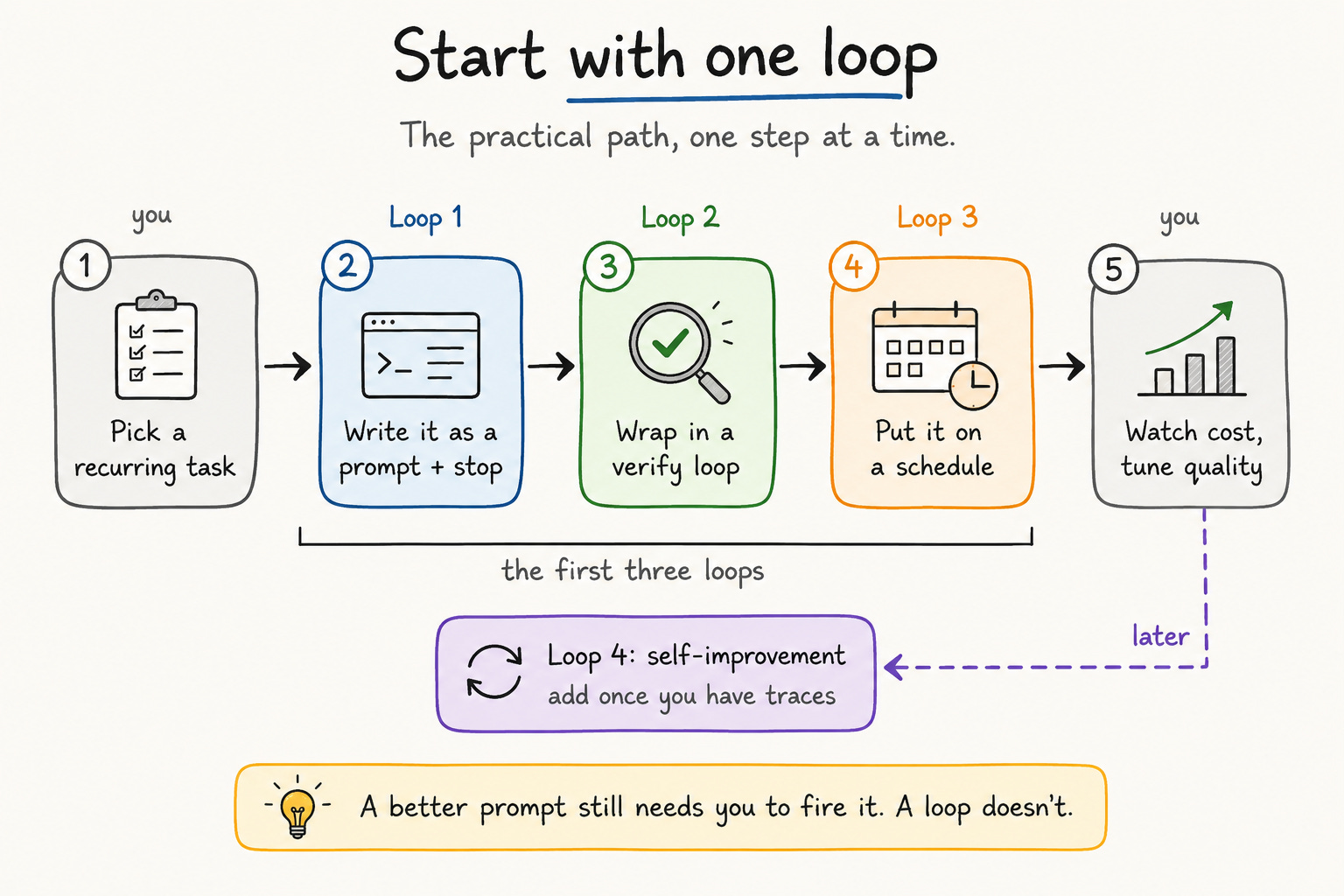
Here is the practical path:
Pick one recurring task you do by hand.
Write it as a prompt with a clear stop condition.
Wrap it in a verification loop so you trust the output.
Put it on a schedule.
Watch the costs and tune the quality.
That is Loop 1, plus Loop 2, plus Loop 3. Add Loop 4 once you have enough traces to learn from.
Follow Karpathy’s autoresearch as your guide. It has 630 lines. It runs overnight and finds real improvements that an expert missed. As swyx put it, “the entire game of the next century is to be able to stack loops as effectively as possible.” The goal is to wring the most leverage out of each loop iteration, not to run the most agents.
You have spent your career getting good at telling computers what to do. The next move is teaching the system to ask the questions for you. Start with one loop, and watch what it does while you sleep.
Cheers,
Eric
Eric Roby
Find me online:
LinkedIn / YouTube / Threads
Article References
[1] Peter Steinberger, X —

[2] Boris Cherny, Acquired (YouTube) —
[3] Andrej Karpathy, No Priors (YouTube) —
[4] Addy Osmani, "Loop Engineering" — https://addyosmani.com/blog/loop-engineering/
[5] swyx, Latent Space, "Loopcraft" —

[6] Sydney Runkle, LangChain, "The Art of Loop Engineering" — https://www.langchain.com/blog/the-art-of-loop-engineering
[7] Claude Code, GitHub Actions docs — https://code.claude.com/docs/en/github-actions
[8] SmartScope, Claude Code /loop explainer — https://smartscope.blog/en/generative-ai/claude/claude-code-loop-command-session-scheduler/
[9] OpenAI Codex, Automations docs — https://developers.openai.com/codex/app/automations
[10] OpenAI Codex, Subagents docs — https://developers.openai.com/codex/subagents
[11] Karpathy, autoresearch repo — https://github.com/karpathy/autoresearch
[12] Karpathy, autoresearch results, X —


[13] Fortune, Cherny on coding by hand — https://fortune.com/2026/06/11/anthropic-claude-boris-cherny-doesnt-write-code-by-hand-anymore/
[14] Boris Cherny, Dec 2025 metrics, X —

[15] Anthropic, "Prompt caching with Claude" — https://claude.com/blog/prompt-caching
[16] PromptHub, prompt caching comparison — https://www.prompthub.us/blog/prompt-caching-with-openai-anthropic-and-google-models
[17] LangSmith Observability — https://docs.langchain.com/oss/python/langchain/observability
[18] swyx, "stack loops," X —

